Introducing aztools
aztools is a collection of tools mostly in python I have been using over the years to analyze telescope X-ray data. I am putting these out so people my find them useful either as a whole as snippets of code. Also, they out here for the sake of the reproducibility of the published work.
The following examples are meant to get you started.
[1]:
# setup the environment
import numpy as np
import matplotlib.pylab as plt

import aztools as az

# add plot settings
az.misc.set_fancy_plot()
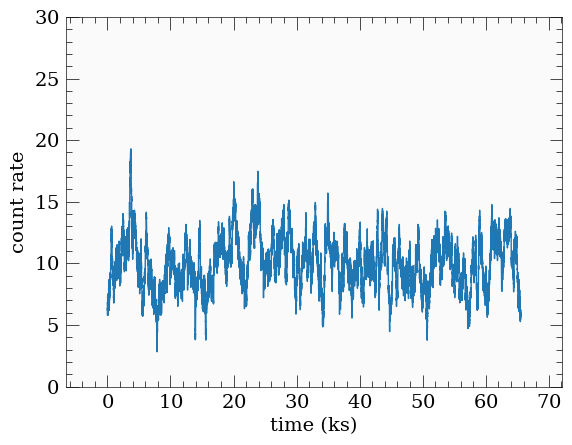
Simulting light curves using the SimLC class
Using the simulation module includes:
Create a
SimLCobject, with seed if needed.Define the shape of the power spectrum (e.g.
powerlaw,broken_powerlawetc)call
simulateto generate a random light curve given the defined power spectrum
[2]:
nlength = 2**16 # number of points desired
dt = 1.0 # sampling time
mu = 10.0 # light curve mean
norm = 'rms' # the normalized of the psd

sim = az.SimLC(seed=393)

# for browen_powerlaw, the parameters are: [norm, index1, index2, break_frequency]
sim.add_model('broken_powerlaw', [1e-5, -1, -2, 1e-3])

sim.simulate(nlength, dt, mu, norm=norm)
[3]:
# plot the light curve #
plt.plot(sim.lcurve[0]/1e3, sim.lcurve[1])
plt.xlabel('time (ks)')
plt.ylabel('count rate')
plt.ylim([0, 30])
[3]:
(0.0, 30.0)
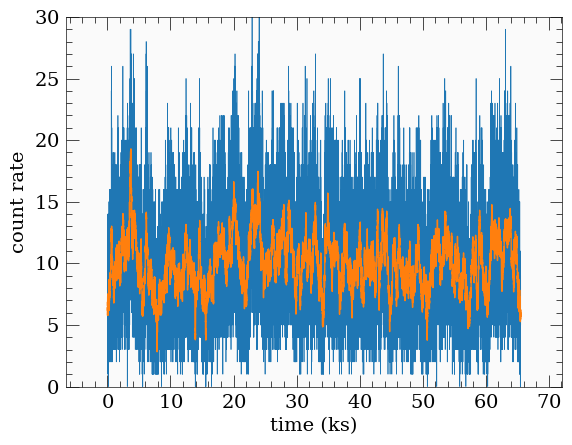
We can add poisson noise for example
[4]:
y = sim.add_noise(sim.lcurve[1], deltat=dt, seed=345)
plt.plot(sim.lcurve[0]/1e3, y, lw=0.5)
plt.plot(sim.lcurve[0]/1e3, sim.lcurve[1])
plt.xlabel('time (ks)')
plt.ylabel('count rate')
plt.ylim([0, 30])
[4]:
(0.0, 30.0)
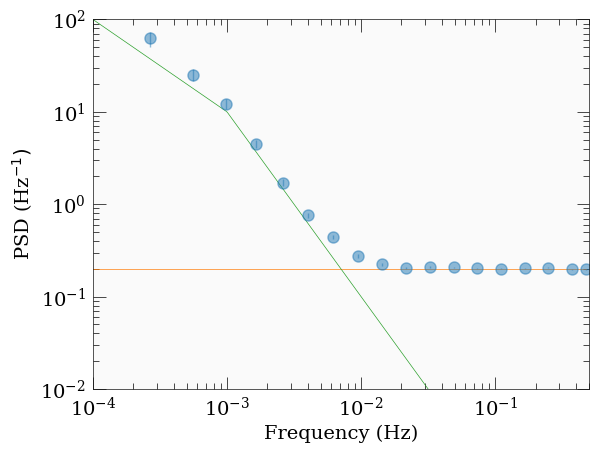
We can now use the LCurve functionality to calculate the power spectrum for example.
First, we calculate the raw psd, then we bin it
The binning is done by az.LCurve.bin_psd, which in turn calls az.misc.group_array of the frequency array, which takes a parameter fqbin that defines the type of binning used. Here, we bin by the number of frequency bin (by_n), starting with 10 frequencies per bin, and increasing it by a factor of 1.5 every time. See az.misc.group_array for details and more grouping options.
az.LCurve.bin_psd returns 4 variables:
freq: the binned frequency array.psd: the binned power spectrum.psde: the estimated uncertainty on the binned power spectrum.desc: a dict containing some diagnostic useful information about the binning.
[5]:
# calculate the raw psd #
freq, raw_psd, noise = az.LCurve.calculate_psd(y, dt, norm)

# bin the psd, and we average in log-space #
fqbin = {'by_n': [10, 1.5]}
fq, psd, psde, desc = az.LCurve.bin_psd(freq, raw_psd, fqbin, noise=noise, logavg=True)
[6]:
# plot the calculated psd.
# also plot the model psd used to generate the light curve in the first place #
plt.errorbar(fq, psd, psde, fmt='o', alpha=0.5)
plt.plot(fq, desc['noise'], lw=0.5)
plt.plot(sim.normalized_psd[0], sim.normalized_psd[1], lw=0.5)
plt.xscale('log')
plt.yscale('log')
plt.xlim([1e-4, 0.5])
plt.ylim([0.01, 1e2])
plt.xlabel('Frequency (Hz)')
plt.ylabel(r'PSD (Hz$^{-1})$')
[6]:
Text(0, 0.5, 'PSD (Hz$^{-1})$')
[ ]: